Showing posts with label Computer Science. Show all posts

Monday, 22 February 2016

Input/Output Easy Notes

Input
In computing the general meaning of input is to provide or giving something to the computer.in other words the state/act of a computer.
          Component of a computer is being accepting something from the device, from the user is also often called input.
          We categorize input devices because we use them as an input to enter something into the computer. Some of them are given below:
   ·       Mouse
   ·       Keyboard
   ·       touchscreen
   ·       microphone
   ·       webcam etc
we may also called the internal parts of the computer as an input device because we use them to do some work. Such as power-on button because it is an input for the processor or the power supply.
Output
Any information or data that has been processed by the computer or come out from the computer system is known as output.
A simple example of output is anything you view on your monitor, listen from the speakers, headphone etc are outputs.
Basically An output device is a piece of computer hardware equipment used to communicate with the computer.
A Computer use many output devices some of them are given below:
    ·       Printers
    ·       Speakers
    ·       Plotters
    ·       Monitors

These are used as an output devices or used to receive output from the computer system.     

Introduction To MS Power Point

Introduction to Ms PowerPoint
Microsoft PowerPoint is a software product used to perform computer-based presentations. There are various circumstances in which a presentation is made: teaching a class, introducing a product to sell, explaining an organizational structure, etc.

It’s a useful program used to make presentations to others. It can also be used for teaching, making lectures online. With the help of ms powerpoint one can make his presentation or communication more effective. It has many features including designs, slides, tones, music, editing, creating. PowerPoint is a creative application program. 
It has a lot of benefits few of them are given below:
 The Benefits of PowerPoint
There really is 'power' in PowerPoint.
    ·        PowerPoint is flexible and portable. You can take your presentation on the road      without needing to take your computer with you. You can even view your                presentation on a computer that does not have PowerPoint installed.
    ·        It gives you freedom. And by that, I mean you don't need to be standing right            next to the whiteboard - you can move around the room.
    ·        You can engage the audience with animated text, graphics and embed music or        videos. Something a little like this.
    ·        You can even add links to other places, like a website.
    ·        And it's easy. Easy to add pictures and create a photo slide show. And if you          need handouts for your meeting, it's printable.
Layout Of MS PowerPoint


Introduction To MS Excel

Introduction to MS Excel
MS Excel is a powerful spreadsheet program that is easy to use and allows you to manipulate, organize, and visualize your data. It’s a very widely applied spreadsheet in all over the world.
Microsoft Excel has the basic features of all spreadsheets,[3] using a grid of cells arranged in numbered rows and letter-named columns to organize data manipulations like arithmetic operations. it can display data as line graphs, histograms and charts, and with a very limited three-dimensional graphical display. an Excel application can automatically poll external databases and measuring instruments using an update schedule,[11] analyze the results, make a Word report or PowerPoint slide show, and e-mail these presentations on a regular basis to a list of participants.
Ms Excel has many features and specifications.
Excel supports charts, graphs, or histograms generated from specified groups of cells. The generated graphic component can either be embedded within the current sheet, or added as a separate object.
Basic Layout of ms excel is:

There are 5 important areas in the screen.

1. Quick Access Toolbar: This is a place where all the important tools can be placed. When you start Excel for the very first time, it has only 3 icons (Save, Undo, Redo). But you can add any feature of Excel to to Quick Access Toolbar so that you can easily access it from anywhere (hence the name).

2. Ribbon: Ribbon is like an expanded menu. It depicts all the features of Excel in easy to understand form. Since Excel has 1000s of features, they are grouped in to several ribbons. The most important ribbons are – Home, Insert, Formulas, Page Layout & Data.

3. Formula Bar: This is where any calculations or formulas you write will appear. You will understand the relevance of it once you start building formulas.

4. Spreadsheet Grid: This is where all your numbers, data, charts & drawings will go. Each Excel file can contain several sheets. But the spreadsheet grid shows few rows & columns of active spreadsheet. To see more rows or columns you can use the scroll bars to the left or at bottom. If you want to access other sheets, just click on the sheet name (or use the shortcut CTRL+Page Up or CTRL+Page Down).

5. Status bar: This tells us what is going on with Excel at any time. You can tell if Excel is busy calculating a formula, creating a pivot report or recording a macro by just looking at the status bar. The status bar also shows quick summaries of selected cells (count, sum, average, minimum or maximum values). You can change this by right clicking on it and choosing which summaries to show.


Saturday, 30 January 2016

Functions In C

Introduction to function


Functions in C-Language

Modular Programming:

                The idea of the modular programming came from the hardware manufacturing. Hardware Components are made by different manufacturers. Each component perform specific task. These components combined to make a hardware device.
                In modular programming, a program consists of several independent modules, much like hardware. These modules are called functions. Different functions can be developed by different programmers. These modules are combined to make a complete program.

Unstructured programming Language
                The style of writing programs in which the entire program logic contained in a single unit is called Unstructured programming Language.

Structured programming Language:
                The style of writing programs in which the program logic divided into smaller structures or modules. These modules are combined to make a complete program.

Function:
                A piece of code that is designed to perform a specific task is called Function. It is a complete independent program. It is executed by the main function or any other function in the program.
Importance and Advantages of Function:

1: A large computer program may consist of several hundred statements. If the program is written as one long program then it may difficult to debug or test the program. To make this one easier functions are used. Program divided into smaller section which performs some specific tasks for which they are made.
2: Each function is independent. That’s why it makes program easier.
3: since each function is independent so it is written independently. Thus several programmers can develop large program easier.
4: Use of function reduced overall length of the program.
5: function saves the time.

Types of Functions:
There are two types of function used in C Language.
·         Built-In Function
·         User-Defined Function

Built-In Function:
                The Function that have already been as a part of the language is called built-in function. It is defined and can’t be used for other purposes in c language such as variable etc. it is also called library function. There are 32 function used in c language.

User-Defined Function:
                The functions created by the user are called user-defined function. These are also called programmer-defined function. These are written to perform specific tasks for programs.                     


Friday, 29 January 2016

Artificial Intelligence

Artificial intelligence
Artificial Intelligence (AI) is the intelligence exhibited by the computer and software. It is the field of study which shows that how to create the computer and computer software which are capable of intelligence behavior.
Short definition of the AI is:
Ø  “The study and design of intelligent agent” Intelligent agent is the system who takes action that maximize its chances of success.  
Simple Definition:
                                “Put the characteristics of the human brain into the machine So that machine could work like human” e. g taking decision like human or Think like a human.
Branches of AI (Artificial Intelligence):
                                There are Four types of Artificial Intelligence.                         
                                                        I.            Neural Network
                                                      II.            Expert System
                                                    III.            NLP (Natural Language Processing )
                                                    IV.            Robotics
Neural Networks:
                                Neural is derived from the word neuron. Neurons are the cell inside the human mind.there are billions of neurons in the human brain. In Neural Networks put those characteristics that can be performs by human brain into the machine. It’s called Neural Networks.
Expert System:
                Expert system is also a branch of Artificial intelligence  in which you’re communicates with machine. As same as when you’ll talking with the expert human like teacher, doctor , engineer etc. and that human expert give you the answer of your questions frequently. In expert system the machine also gave you the answer of your question frequently and also gave you the suggestions. This is called Expert System.
Natural Language Processing System (NLP):
There are two types of Natural Language Processing (NPL)  :
                1: Written Text Processing
                2: Spoken Text Processing
Written Text Processing:
                Written Text Processing is like a translator. You can take the example or written text processing as a translation program.
for example  If you want to convert an English language sentence into the another language such as urdu, Spanish, Arabic etc . the translator or translation program OR Artificial Intelligence program(AI) understand the sentence and then convert it into desired language.  The same process is execute  in the Written text Processing. This is called Written Text Processing.
Spoken Text Processing:
                It’s same as the written text processing but in spoken processing it provides you to speak and the AI will understand your language and write it on the screen or desired place.
Examples:
                Google Audio Searching
                MS Office
                Search By Voice
Robotics:
                Robot : The machine capable for carrying out the action series automatically , especially one programmable by computer.
Another one is:
                By making any machine looks like human so that machine can moves like humans,  or can take some decision is called robot.
Some robots are programmed by the programmer so that they can only do the tasks for which they are made. But some robots are too intelligent as they don’t only do some tasks but also can take decisions.

So My dear Fellows.
This is the short Introduction of the AI (Artificial Intelligence).

Regard  : Rana Sarmad

                               View/Download Now

Thursday, 28 January 2016

CPU

CPU
(Central Processing Unit)
CPU stands For Central Processing Unit. It’s the most important part of the computer system.
·         In large Computers such as Super Computer and mainframe Computers CPU consists of a number of chips installed on several circuit boards.
·         In personal computers CPU consist on a single chip because of its smaller size. A single chip CPU is also called microprocessor.
CPU consists on two units
> Arithmetic/Logic Unit and Control Unit.
Control Unit :
                 It’s a component of Computer and the part of CPU. It controls the operations of the processor. It’s working is that it tells the computer’s memory, arithmetic/logic unit , input and output devices that how to respond to the program’s instructions. It gets the instruction from the main memory and then decodes them. It then initiates actions to carry out the instructions.
                 It directs the operation of the other units by providing timing and control signals. Most computer resources are manage by the CU(control unit). It also directs or controls the data between CPU (central processing unit) and other devices. In modern computer designs, the control unit is typically an internal part of the CPU with its overall role and operation unchanged since its introduction.
Arithmetic/logic Unit :
           Arithmetic/logic Unit or ALU is a part of the CPU (Central Processing Unit).  It performs all the Arithmetic and  Logic operations on the data. Arithmetic operations are the basic functions such as multiplications, subtractions, additions and division.
On the other hand the Logic operations compared one number with the other number that which number is greater or smaller. Basically it compared two values. The inputs to an ALU are the data to be operated on, called operands, and a code indicating the operation to be performed; the ALU's output is the result of the performed operation. In many designs, the ALU also exchanges additional information with a Status Register, which relates to the result of the current or previous operations.


Tuesday, 8 December 2015

JavaScript

JavaScript
JavaScript is an programming language used to improve the design, forms, detect browsers, create cookies in the HTML. It’s an most popular scripting language in on the WWW(World Wide Web). It’s lightweight language and it can be run on all type browsers.
Important things :
>> JavaScript consist of the lines of executable programming codes used in html.
>>  It’s usually embedded directly to the html. It’s an interpreted language.
>> Everyone can learn and use javaScript with using any type of licence.
                Remember! The Single Word Java and the word JavaScript are different words. Java is an programming language much more like the c language and JavaScript is a language used to create dynamic views in the html.
A JavaScript  :
  •           Can put the Dynamic Text in the HTML pages.
  •          Can react the Events.
  •          Can detect the Visitor’s Browser.
  •          Can be Read and Write HTML elements.
  •          Can be used to create cookies.

We can use JavaScript in the html tags. And it’s written in the <script> & </script> tags.
Example :
<html>
                <head>
                                <title> ……… </title>
                </head>
<body>
                                <script>
                                                Here we’ll write the JavaScript code.
                                </script>
</body>

</html>

Download Now      

Thursday, 3 December 2015

Introduction to MS Word and Interface

Ms Word
Ms word is an application program used to create documents, letter, books etc. It is also called the word processing.
Before the use of computers, the word processing is done by the typewriter. A Typewriter can only create text documents. A special techniques are used to add graphics in the documents.
Now a days it’s all is done by special application programs called Ms Word . the ninty persent 90% of the worlds computers have ms word installed. It’s not only an electronic type . With the help of word processing we can add images, videos, audios, notes, in the documents and print the documents in different forms.
Newspapers, magazines, books, letters are prepared by Ms word. A latest Word processor is Ms Word 2014, and Ms word 2007 .
With the help of Ms word :
·         We can add images , designes, formats and videos in the document.
·         We can easily delete text from the document.
·         We can easily move Text from one place to another place in document.
·         We can delete pargraphs.
·         We can insert text or paragraphs in the document.
·         We can make user –friendly document by designed it.
·         We can print documents in different forms.
Even we can make our documents according to our desire.
Interface of Ms Word (2007)

Basic Features of MS Word
Cut :
                We can cut text  from the document.
Copy:
                We can copy text from the document..
Paste :
                Paste Text anywhere in the document.
Bold :
                We can make the text bold by pressing bold buttion or by pressing ctrl+b.
Italic :
                It’s used to make text italic. It can be done by clicking on italic option or ctrl+i.
Underline :
                Used to make text underline. It can be done by clicking on U   or by ctrl + U.
Subscript :
                Used to make subscript for example è X2 .
SuperScript:
                Used  to make superScript . For example è X2
Alignment:

            We can justify text alignment in left, right, or center and just justify . it can be done by ctlr + l , ctrl + r , ctrl + e and ctrl + J
l for left, r for right and e for center alignment. 


Saturday, 28 November 2015

Networks

NETWORK’s
There are three types of networks.
1.      LAN (Local Area Network)
2.      Wan (Wide Area Network)
3.      MAN (Metropolitan Area Network)

LAN (Local Area Network):
                        LAN stands for local area network. It’s a collection of computers, usually personal computers , that share hardware, software and data. In simple tems LAN’s holds the personal computers through the media and so each personal computer can shate the resourse of the other. As the name implies, LAN’s cover short distances, such as with in campus, builiding, or office.
LAN’s Components :
            Lan’s don’t use telephone lines for sharing the resources, it’s used the speacial components:
  v  To share the computer systems we need some resources . that’s why in LAN’s networks the Network cables are used to connect all computers. Somtimes coaxle cable may be used. The difference between network cable and coaxle cable is the speed. Coaxle cable have more speed than network cable. Moreover computers can be connected with wireless connection but it’s slower than the both (network cable & coaxle cable).
  v  A network card oftern called as NIC card.  It’s the card used in the wiring to connect the computers. In desktop computers it fit’s in the slot expension in the cpu.  NIC used to determines the speed , message, sending and receiving of the data transmission.
   v  Bridge , it is used to connect the similar networks using same protocol.
  v Gateway, it is used to connect with the computers on the other networks. It’s the collection of hardware/software that let’s the computer to communicate with other computers on dissimilar networks. One of the main task of the gateway is protocol conversion.
  v  Base Station : a Wireless access point often called base station is used to connects to a wired area networks provides wireless transmit / receive capabilities over a radius of several hundered feet. Even through non-metal walls, computers can connect with wireless NIC’s to the network through these access points. 

Metropolitan Area Networks (MAN):

A metropolitan area network, or MAN (plural: MANs, not MEN) is basically a bigger version of a LAN and normally uses similar technology. It might cover a group of nearby corporate offices or a city and might be either private or public. A MAN can support both data and voice, and might even be related to the local cable television network. A MAN just has one or two cables and does not contain switching elements, which shunt packets over one of several potential output lines.


Wide Area Network (WAN)

A WAN is a data communications network that covers a relatively broad geographic area (i.e. one city to another and one country to another country) and that often uses transmission facilities provided by common carriers, such as telephone companies.


Monday, 23 November 2015

Loops Of Programming Language...

Loops Constructs                      Written By Rana Sarmad

Loop:
            A statement of a set of statements that is executed repeatedly is called Loop. The statement of a set of statements in a loop is executed for a specified  number of time until given condition remains true.

Types of Loops In Programming language:
                        The are three types of loops in programming language. These are given below:
1: While Loop
2: Do-While Loop
3: For loop

While loop:
            It’s  a Conditional loop statement. It is used to execute a statement(s) as long as the given condition remains true.

Syntax:
while(Condition)
{
            Statement(s)... ;
}

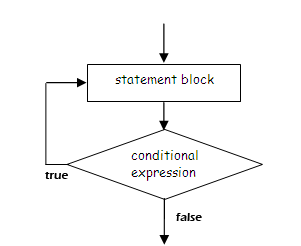
Condition: Condition consist of a relational expression. If it is true, the statement  or the set of statements given in the while loop is executed.

Statement: It represents the body of the loop. The compound statement(s) are written within the curly braces {}.

Flow Chart of The While Loop:

Do While Loop:
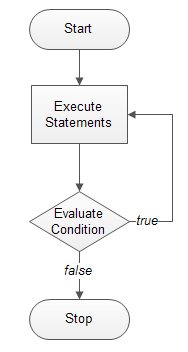
            It is same as the while lOop but in this loop the statement must be executes at least once.  After then the condition of the loop will be checked.
Simply in this loop the body of the loop executed before the condition.

Syntax:
do
{
Statement(s)... ;
}
while(Condition);
do : It’s simply meaning is do(Karo) in Simply word we can use  the word__Execute__ here.  the body of the loop execute first.

Statement : It’s represents the body of the loop.

Condition: it is the condition . if it is true the body of the loop execute again otherwise it’ll not.

Flow Chart of the Do-while loop

The Difference between While and do-while loop


               ( while Loop )                     ( do-while Loop )

         ·   The test condition comes before the body of the loops. First condition check and then body execute if the condition is true.
          ·  The while statement does end with the semicolon (;).
              
        ·  The test condition comes after the body of the loop. First body executes and then condition is checked. The body will executes if conditon become true.otherwise not.
           · The while statement ends with semicolom.


For Loop:
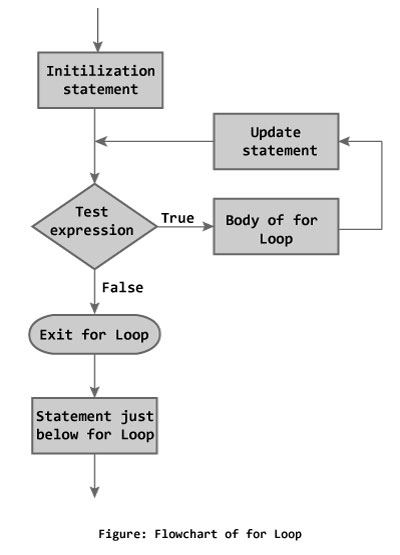
            The “For Loop” statement or loop is used to execute a set statement repeatedly  for a specified number of times. It is also know as the counter loop.

Syntax:
            for(initialization; condition; increment/decrement)
_______________it’s the syntax and after then it’s body.
{
Statements ;
}

Initialization: in initialization the variable assigned to an initial value. More than one value may be initialize. For example:
for(a = 6, b = 5, a<10; a++)
Condition , Increment , Decrements  are we read previous.
Flow Chart of for Loop


The Nested Loop : 
                        A Loop  structure completely inside the body of the another loop structure is called nested loop. The following points should be considered while writing the nested loop 

  • Nesting can be done up to any level . However, as the level of nesting increased, the loop structure becomes more complex.
  • Any loop structure can be placed within any other loop structure. for example, a "do while Loop"  may be placed within the "for loop" or "while loop"
The concept of nested loops is explained in the following program which will print asteriks (*) According to the pettern shown below:


* * * * *
* * * * 
* * *
* * 
*

#include <stdio.h>
void main (void)
{
     int       inner, outer ;
    for (outer = 5 ; outer >= 1 ; outer --)
        {
            ineer = 1 ;
            while (inner <= outer)
                     {
                         printf("*") ;
                         inner ++ ;
                      }
            printf("/n") ;
          }
}


In the above program... 
  • The while loop is used inside the body of the for  loop. the while loop is, therefore, the nested loop. the for loop is the outer loop. 
  • the outer loop is executed 5 times. 
  • For each iteration (Repeatation) of the outer loop, the inner loop executes until the value of the variable becomes outer. thus with each iteration of the outer loop, the number of iteration of the inner loop decreases....

Click here for Download